
Your Inventory List works best as a staging area between product discovery and live listing. Instead of jumping straight from catalog search to publication, you can use Inventory List to hold promising products, group them with tags, and decide what deserves the next step.
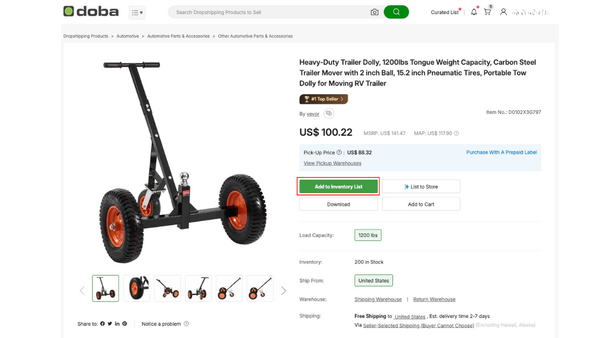
Quick answer: Open the product detail page, click Add to Inventory List, choose or create a tag if needed, and confirm the action so the product appears in your Inventory List.
Why use Inventory List first
Inventory List gives you more control before a product goes live.
It is useful when you want to:
- save products for later review
- organize products into groups
- monitor updates before listing
- prepare multiple products for future listing workflows
- Open the product detail page.
- Click Add to Inventory List.
- Choose an existing tag or create a new one.
- Click Confirm.
After that, the product should appear in Inventory List with the tag you selected.
When to create a new tag
Tags are helpful when your product research is starting to grow beyond a simple saved list.
For example, you may want tags for:
- niche collections
- seasonal product testing
- supplier comparisons
- products that still need shipping review
- products that are almost ready to list
How Inventory List fits into the larger workflow
A good workflow usually looks like this:
- Search products.
- Filter down to the strongest options.
- Add the best products to Inventory List.
- Group them with tags.
- Review shipping, supplier, and channel fit.
- Move the final products into listing workflows.
This keeps your listing work cleaner and reduces rushed decisions.
What to do after a product is in Inventory List
Once the product is saved, you can decide whether to:
- keep tracking it
- organize it with other products under a tag
- turn on monitoring for the tag group
- move toward listing it to your store
Why this step reduces support issues later
Inventory List gives you room to evaluate products before they create downstream problems around shipping, pricing, or fit. The more structure you add before listing, the easier it becomes to manage products consistently across your workflow.