
Inventory questions should be checked before you list, not after an order problem appears. The best way to judge stock is to review the product detail page, use inventory-related filters while researching, and treat low-visibility products more carefully.
Quick answer: To check whether a product is in stock in Doba, review the product detail page for inventory visibility, use inventory-related filters during search, and keep an eye on Inventory List monitoring if the product is something you plan to track over time.
Start with the product detail page
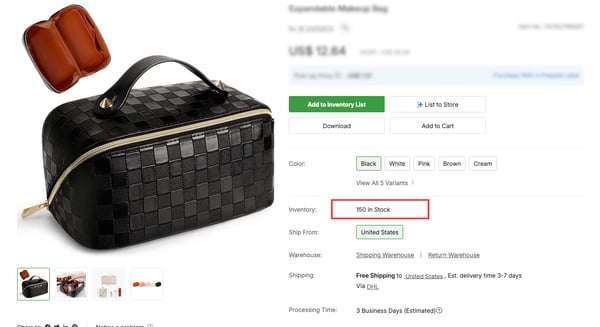
The product detail page is the best place to review what the listing is showing about product availability.
That page gives you the closest view of whether the item currently looks viable before you move into a listing workflow.
Use inventory filters earlier in the research process
If you are still searching the catalog, inventory-related filters can help you reduce weak candidates earlier.
This is especially useful when you want products that are more likely to support ongoing listing and fulfillment rather than one-time testing only.
What inventory visibility should help you decide
You are usually trying to answer three questions:
- Does this product look ready to list right now?
- Does the stock level seem dependable enough for my current promotion plan?
- Should I keep tracking this item before I list it more aggressively?
When to move a product into Inventory List first
If you are interested in a product but not fully ready to list it, add it to Inventory List first.
This gives you a cleaner way to organize the product, apply tags, and monitor updates before you treat it like a stable listing candidate.
Why inventory should not be your only decision point
A product can appear in stock and still be a weak listing choice if:
- shipping time is too slow
- shipping cost breaks your pricing model
- supplier quality is not strong enough
- channel restrictions make the product risky to list
Inventory visibility matters, but it works best when you check it alongside shipping, supplier, and channel fit.
How to reduce stock-related problems later
- Use inventory filters while researching.
- Review the product detail page before listing.
- Add the product to Inventory List if you want to monitor it.
- Use tags and monitoring if it is part of a larger shortlist.
This workflow helps reduce the chances that you list a product too quickly and discover the inventory problem later in the process.
When to slow down before listing
If the product looks promising but you still feel uncertain, do not rush to publish it. Track it first, compare it with similar items, and confirm that the broader product conditions still support your store strategy.